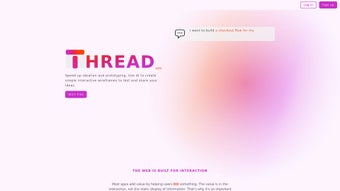

Download Thread App – AI‑Powered Wireframe Builder for Designers & Teams
Why AI‑Driven Wireframing Is Changing the Design Landscape
In today’s fast‑paced product cycles, the time spent on early‑stage design can make or break a launch. Traditional wireframing tools require a solid grasp of UI principles, a library of components, and often several hours of manual layout work before a concept can be shown to stakeholders. That friction slows decision‑making, inflates budgets, and creates unnecessary back‑and‑forth between designers, product managers, and developers.
Enter AI‑driven wireframe generators: they translate plain‑language ideas into functional mock‑ups within seconds, allowing teams to validate concepts, gather feedback, and iterate rapidly. Thread App sits at the forefront of this movement, combining a powerful natural‑language model with a full‑featured design environment that lives entirely in the browser. Whether you’re a solo founder sketching a SaaS dashboard, a marketing team needing a quick landing‑page prototype, or an enterprise design department looking for secure, collaborative tooling, Thread App promises to cut prototyping time by up to 80 % while keeping the creative control firmly in your hands.
This introductory section explains the problem Thread App solves, the benefits of AI‑assisted design, and why you should consider adding it to your product‑development toolbox.
Overview
Thread App is a cutting‑edge, web‑based design platform that uses artificial intelligence to turn simple text descriptions into fully interactive wireframes. Built for both seasoned UI/UX professionals and non‑designers, the platform streamlines the early stages of app and website development by generating mock‑ups in seconds rather than hours. Whether you’re brainstorming a new mobile app, iterating on a SaaS dashboard, or needing a quick prototype for stakeholder review, Thread App lets you describe your vision, watch the AI craft a matching layout, and then customize every element to suit your brand or functional needs.
The three‑step workflow—describe, generate, refine—removes the steep learning curve associated with traditional design software such as Sketch or Figma, making wireframing accessible to anyone who can articulate a concept. In addition to speed, Thread App emphasizes collaboration: generated wireframes can be shared instantly with teammates, commented on, and exported for further development. The service offers flexible pricing plans, including a free tier for hobbyists, while enterprise packages provide advanced security, single‑sign‑on, and version‑control integrations.
Thread App also employs end‑to‑end encryption for all cloud‑stored assets, and its AI model is continuously retrained on the latest design patterns, ensuring that the output stays modern and industry‑relevant. Overall, Thread App positions itself as the go‑to AI‑enhanced prototyping app that bridges the gap between idea and implementation without sacrificing quality or usability.
Core Features & Compatibility
Key Features
- AI‑driven wireframe generation from natural‑language prompts, allowing users to type “dashboard for a fintech app with a dark theme and real‑time charts” and receive a ready‑to‑edit layout.
- Real‑time editing tools for layout, typography, and component styling, including snap‑to‑grid, auto‑spacing, and a built‑in color‑palette manager.
- Responsive preview mode that automatically adapts designs for Windows, macOS, Android, and iOS devices, with breakpoint controls for fine‑tuning.
- One‑click export to PNG, SVG, or HTML/CSS, providing developers with clean, standards‑compliant code and designers with vector assets for branding.
- Team collaboration hub featuring threaded comments, version history, role‑based permissions, and instant sharing via secure links.
- Integrated component library with over 500 UI elements, ranging from basic buttons to complex data tables, all searchable by category and tag.
- Secure cloud storage with AES‑256 encryption, two‑factor authentication, and optional SSO for enterprise environments.
- Automatic background updates that keep the AI model and UI fresh without manual patches, reducing maintenance overhead.
Compatibility
Because Thread App runs entirely in the browser, it works on any modern operating system that supports a recent version of Chrome, Edge, Safari, or Firefox. This includes Windows 10/11, macOS Monterey and later, as well as mobile platforms such as Android 9+ and iOS 13+. The responsive design ensures that you can start a wireframe on a desktop, continue editing on a tablet, and present the prototype on a smartphone without losing fidelity. For organizations that require on‑premise deployment, Thread App offers a Docker‑based container that can be hosted behind corporate firewalls, guaranteeing compliance with strict data‑privacy regulations. The web‑only approach also means zero‑install access for guests and contractors, while a lightweight Electron wrapper is available for users who prefer a native desktop experience on Windows or macOS.
Pros & Cons
- Pros:
- Lightning‑fast AI generation cuts prototyping time by up to 80 %.
- Intuitive three‑step process eliminates the need for extensive design training.
- Cross‑platform accessibility—no installation required for the core web app.
- Robust collaboration features keep teams aligned and reduce feedback loops.
- Free tier available for students, hobbyists, and small projects.
- Cons:
- AI output may need manual tweaking for highly custom UI requirements.
- Advanced component library only accessible on paid plans.
- Export to code is limited to HTML/CSS; no direct React, Vue, or Flutter output yet.
Installation & Usage Instructions
Getting started with Thread App is deliberately simple, reflecting its mission to make wireframing as frictionless as possible. Follow these steps to download, install (if you prefer the desktop wrapper), and begin creating AI‑powered mock‑ups:
- Visit the official website. Navigate to threadapp.io and click the “Get Started – Free” button. The site automatically detects your browser and suggests the optimal version.
- Create an account. Sign up with an email address, Google, or Microsoft account. A verification email is sent for security; confirm it to unlock full functionality.
- Optional desktop app. For users who prefer a native experience, download the Electron‑based wrapper for Windows or macOS from the “Download” page. The installer is signed, ensuring a secure and tamper‑free installation. After installation, log in with the same credentials used online.
- Start a new project. Click “New Wireframe” on the dashboard. A modal appears where you can type a concise description, e.g., “A mobile banking app login screen with biometric authentication, brand colors teal and white, and a friendly greeting.”
- AI generation. Press “Generate.” Within seconds, the AI renders a wireframe that matches the description. You can toggle between “Desktop View,” “Tablet View,” and “Mobile View” to see responsive variations.
- Refine & customize. Use the left‑hand toolbar to drag‑drop components, edit text, adjust spacing, or replace icons from the built‑in library. The changes are saved automatically to the cloud, and version history lets you revert to earlier iterations.
- Collaborate. Click “Share” to copy a secure link or invite teammates via email. They can comment directly on the wireframe, suggest edits, or approve the design. Permissions can be set to view‑only, comment, or edit.
- Export. When satisfied, choose “Export” and select the desired format (PNG for presentations, SVG for vector editing, or HTML/CSS for developers). The export includes a style guide that lists fonts, colors, and spacing values used in the design.
- Integrate with project‑management tools. Connect Thread App to Jira, Trello, or Asana. Wireframes can be attached automatically to tickets, keeping design intent alongside development tasks.
Regular updates are pushed to both the web platform and desktop wrappers, delivering new AI models, UI improvements, and security patches without user intervention. For enterprises, the admin console provides granular control over user permissions, SSO configuration, and audit logs, reinforcing the tool’s suitability for secure, large‑scale environments. If you encounter any issues, the built‑in help center offers step‑by‑step tutorials, and a community forum is available for peer‑to‑peer troubleshooting.
FAQ & Conclusion
Is Thread App really free to use?
Yes, Thread App offers a free tier that includes unlimited AI‑generated wireframes, basic component library access, and cloud storage for up to three projects. Paid plans unlock advanced features such as premium UI kits, higher export resolutions, and enterprise‑grade security.
Can I export wireframes to code frameworks like React?
Currently Thread App exports HTML and CSS directly. For React, Vue, or Flutter, you can import the exported HTML into your preferred framework and then convert the markup to JSX or Dart manually. The development team has announced a roadmap for native framework exports in upcoming releases.
How secure is my data when I store wireframes in the cloud?
Thread App uses end‑to‑end encryption (AES‑256) for all stored assets. Access is protected by two‑factor authentication, and enterprise customers can enforce SSO with SAML or OAuth. Regular security audits ensure compliance with GDPR, CCPA, and ISO‑27001 standards.
Do I need any design experience to use the AI generator?
No design background is required. The AI understands plain‑language prompts, so you can simply describe the layout you envision. After generation, you can fine‑tune the design using drag‑and‑drop tools, making it ideal for product managers, marketers, or developers who need quick prototypes.
Is there a desktop version for offline work?
Yes, Thread App provides an Electron‑based desktop client for Windows and macOS. While the core AI generation still requires an internet connection, you can edit, comment, and export your wireframes offline; changes sync automatically once you’re back online.
Can Thread App integrate with version‑control systems like Git?
Thread App does not push design files directly to Git, but you can export the HTML/CSS or SVG assets and commit them to any repository manually. For teams using GitHub or GitLab, the platform provides a webhook that can trigger a repository update whenever a new export is generated.
Conclusion & Call to Action
Thread App represents a paradigm shift in early‑stage design, combining the speed of AI with the flexibility of a full‑featured prototyping tool. By allowing anyone to describe a concept and instantly receive a polished wireframe, the platform cuts down on wasted iterations, accelerates stakeholder buy‑in, and frees designers to focus on higher‑level creativity. Whether you’re a solo founder, a cross‑functional product team, or an enterprise looking for secure, collaborative design infrastructure, Thread App offers a free entry point that scales with your needs. Ready to experience faster, smarter wireframing? Download Thread App now, create your first AI‑generated prototype, and see how much time you can reclaim for what truly matters—building great products.
Pros:
- Rapid AI wireframe generation.
- Zero‑install web access.
- Robust collaboration suite.
- Free tier for small projects.
- Secure cloud storage with encryption.
Cons:
- Limited direct code export for modern frameworks.
- Advanced UI kits locked behind paid plans.
- AI may need manual refinement for highly bespoke designs.



.png)



